Capri help
New in 0.7.9
- Clones (beta)
- “clone yourself” or “activate chaos mode”. They keep multiplying, talk to each other and steal your cursor. They grab your app windows and drag them around too, but not while you're gaming, streaming or using the mouse. Holding Esc clears them and puts every window back. “Make 3 clones” makes three. Windows only for now
- Upset her
- call her annoying and her clones might come out, and by the third insult they always do. Settings → CAPRI → Chaos when upset turns that off
- Diagrams
- “make a diagram and help me understand linear algebra”. She draws it on your screen and talks you through it. Windows only for now
- Discord status
- it moves now, with her artist's animations, and shows when she's using the computer, playing a game or streaming
- Streaming
- ask in your own words, on any game and any brain, and on Linux too. Each minute is 40 seconds on the game and 20 for chat
- Game menus
- brains other than Claude can press buttons by name, and each button in a row gets its own spot
- Listen for Capri
- stays open through long jobs, streams and Gaming Mode
- The time
- ask her and she reads her own clock
- Music
- she dances to AIMP, foobar2000, Winamp, MusicBee and more
- Gemini keys
- keys that start
AQ.connect
Install
Windows 10 or 11, 64-bit
- Download
- Open
Capri-Setup.exe - “Windows protected your PC”? More info → Run anyway
- Install Capri
- “Installing the local speech model”: her free voice, about 316 MB. Skip gets it later
- Admin
- not needed, installs for your Windows user
- Folder
%LOCALAPPDATA%\Capri- Shortcuts
- Start menu, plus desktop if you tick it
- Startup
- she starts with Windows; turn it off in Settings
- Needs
- nothing else, not Ollama, not Claude Code
Windows warns because Capri is new and not signed yet. Got Capri from this site or GitHub? Then antivirus alerts like Wacatac, Zusy or MachineLearning/Anomalous are false alarms on a new app. Restore the file and allow it. The code is open on GitHub.
Check your download
- Open PowerShell in Downloads, run
Get-FileHash Capri-Setup.exe - Match it with
SHA256SUMS.txton the release page
Mac preview, macOS 15+
- Download Apple Silicon or Intel
- Unzip, drag Capri into Applications
- Terminal:
xattr -dr com.apple.quarantine /Applications/Capri.app - Open Capri
- Install Ollama, run
ollama pull gemma4:e4b
Apple hasn't approved (notarized) Capri yet, so macOS calls her “damaged” until you run that line. It only clears the downloaded-from-the-internet flag on Capri. No Dock icon is normal.
Linux preview, x64
- Download Capri-linux-x64.tar.gz, unpack it
- Run
Capri/Capri - Install Ollama, run
ollama pull gemma4:e4b
X11: she sits on windows. Wayland: bottom of the screen only.
First run
- She glitches in and drops onto a window or the taskbar
- The Capri Mainframe opens by itself
- NORMAL → Set up her brain. Slow PC? HIGHER → Free key
- She talks with her free voice. Another voice: CLOUD VOICE → Fish Audio under VOICE, free tier
- Pencil
- hover her, press it, type, Enter
- Wave
- voice chat, free without a key
- Right-click
- her menu
- Greeting
- her own recorded voice, no key or credits
- Next time
- the Mainframe starts minimized: right-click her → Open Capri Mainframe
The Mainframe
Right-click her → Open Capri Mainframe. The X only hides it. Settings at the top opens every other setting beside it.
BRAIN
Pick one. Only one brain runs at a time. Each row keeps its own key.
- NORMAL
- free, local model. Start with this!
- HIGHER
- free NVIDIA key
- MAX INTELLIGENCE
- ChatGPT or Claude key, needs credits
- Model menu
- pick another model. On HIGHER, Nemotron Super and Nemotron's reasoning model are marked recommended, at the top
- Refresh
- look for her brain again, like after opening Ollama
- Set up her brain
- download her built-in brain
- Key box
- on HIGHER and MAX: paste a key → Connect
- Forget
- red when the box is empty: removes that row's key
- Free key
- opens NVIDIA to make a free key
VOICE
Pick one. Each row keeps its own setup and key. Before 0.7.6 the rows were FREE VOICE and ELEVENLABS.
- OFF
- no voice: she types her replies (0.7.1)
- PREBUILT LOCAL
- her own voices: free, runs on your PC, no credits
- CUSTOM LOCAL
- a voice model you run on your PC: Set up
- CLOUD VOICE
- Fish Audio (free tier), ElevenLabs or OpenAI, with your own key. ElevenLabs uses your credits
- Setup guide
- on CLOUD VOICE: ElevenLabs' steps, or the panel for Fish Audio and OpenAI
- Free voice
- on PREBUILT LOCAL: Her own, Bright, Sly, Sharp or HD. Get free voice if it's missing
- Key box
- on ElevenLabs: paste the key → Connect
- Voice ID
- on ElevenLabs: paste it or pick from your voices
- Model
- Default model, or v4
- Mic
- pick your mic
- Test
- she says a test line
- Ctrl + Alt + V
- voice chat on or off, click the hint to change
- Ctrl + Alt + N
- mute your mic, click the hint to change
- Ctrl + Alt + T
- type to her, from anywhere
- Ctrl + Alt + H
- hide or show her
CAPRI
- Hide Capri
- she stays in the tray
- Bring here
- to your mouse pointer
- Ride cursor
- she follows your mouse
- Check for updates
- check now
- Help
- opens this page
- Quit Capri
- closes her
Settings
- Size
- Tiny to Giant
- Check in on me
- on by default, she pops up now and then, even over games, and asks for attention if you ignore her for hours
- Always on top
- above other windows
- Mainframe size
- Auto or 100% to 200%. Auto makes the Mainframe bigger when Virtual Super Resolution or DSR draws a bigger desktop on your screen (0.7.7 and newer)
- Watch my screen
- she comments, Every 10 s to 10 min
- Keep her caught up
- on by default, she also remembers the glances she keeps quiet about. Uses a little more of your API
- Language
- 80 languages for her replies
- What should she call you?
- type a nickname → Save.
choomresets it - Get to know me
- she asks your name, your pronouns and what you're into, and keeps them in me.md
- Open her notes
- me.md, what she remembers
- Volume
- her voice, Mute to 150%
- Pitch
- every voice higher or deeper, -6 to +6, same speed
- Speed
- every voice, 0.7x to 1.5x
- Robot
- a smooth synth under her voice on the nearest note, like a talk box, Off, 5%, 10%, 15%, 20% to 100%. HD keeps its own, Off to start (“Off · HD”)
- Glitch
- stutters, crushed bits and skips, Off, 5%, 10%, 15%, 20% to 100%. HD keeps its own, Off to start. Let go of Pitch, Speed, Robot or Glitch and she says a line in the voice she's using. ElevenLabs and voice chat too
- Layers
- the button in VOICE's heading, off by default. Two copies of her mixed in under her, so she sounds doubled with an AI shimmer: LAYER 1 +1.5 and LAYER 2 -2.5 semitones to start, both 25 ms behind her. Each has its own Pitch (-12 to +12) and Delay (0 to 250 ms), and MAIN's Pitch is the Pitch above. Every voice, ElevenLabs and voice chat too. Mac and Linux: Settings → Voice style → Layers
- Sounds
- her effects, Off to 100%
- Typing sound
- while her text types out
- Free voice in games
- only while HD is on, off by default. On, her free voice talks while a game or video is full screen, so the game gets your graphics card
- Wander
- Off to Restless
- Sleep
- Never to 30 min
- Dance to music
- when songs play
- Glitch in at startup
- tendrils and sound when she starts
- Replies
- Short, Medium, Long
- Memory
- how much chat she keeps in mind
- Bubble
- how long replies stay up: Quick, Normal, Long
- Custom model name
- any pulled Ollama model or model id on your key → Use
- Start with Windows
- on by default, she starts when you sign in
- Show on Discord
- on by default, your Discord profile shows "Playing Capri" and what she's doing
- Use her cursor
- on by default, she searches YouTube, plays from Spotify's search, and drags Spotify's volume slider when you say Spotify
- Security
- where Blackwall mode was. Lockdown, Guarded, Trusted (the default) or Blackwall, and eleven toggles for what she does without asking. Off, she asks first and does it when you say yes. Blackwall mode is the Blackwall preset now
- Perch
- her frames a second while she sits on a window, 10 to 60 fps, 30 by default. Over 30 uses more CPU
- Remember our chats
- on by default, daily transcripts and memories.md that stay on your PC
- Open her memories
- memories.md and her daily transcripts, on this PC only
- Keys
- Talk, Mute mic, Type and Hide/show: click, press any key or combination, then Confirm
Right-click menu
- Size
- Small, Medium, Large, Huge, Giant
- Move
- Wander around, Dance to music, Dance, Ride cursor, Sit on windows, Sit here, Hang here, Go to sleep, Bring to this screen, Go to the next screen
- Help
- Help page, Join the Discord, Copy error details, Check for updates
- Tray icon
- same menu. Double-click: bring her back. Hidden? Check the ^ by the clock
Her brain
- Most PCs
- NORMAL → Set up her brain: free, private, offline after the download
- Slow PC
- HIGHER → Free key: fast, nothing to download, needs internet
- Ollama
- NORMAL, open it → Refresh
- Smartest
- MAX INTELLIGENCE: OpenAI, Claude or DeepSeek key with credits
She uses the row you picked. NORMAL runs Ollama if it's open, else her built-in brain. A row without its key uses NORMAL until you connect one.
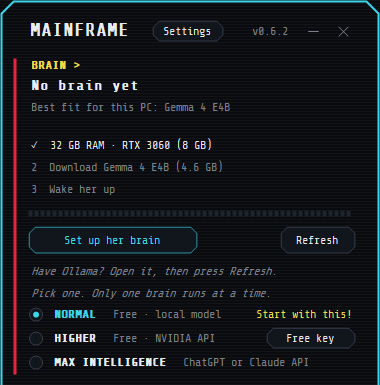
Built-in brain picked for your PC
- Gemma 4 E4B
- 4.6 GB: 7 GB+ graphics card and 12 GB+ RAM
- Gemma 4 E2B
- 3.1 GB: 7 GB+ RAM or 4 GB+ graphics card
- Qwen3 4B
- 2.5 GB: other PCs, can't see your screen
Stopped downloads pick up where they left off. Her “eyes” (about 560 MB) download the first time she watches your screen.
Free NVIDIA key
- Mainframe → Free key, or build.nvidia.com
- Sign in or make a free account. NVIDIA may ask to verify your phone
- Generate API Key, copy it. It starts with
nvapi- - Pick HIGHER, paste it in the box → Connect
She starts on nvidia/nemotron-3.5-super-vl-120b-a12b. It can see your screen. Most NVIDIA models can't. If a model doesn't answer, she switches to another for that reply. Your pick stays.
RAM and storage
- “Not enough free RAM”
- Close apps, browser tabs or games, then try again. Or use the free NVIDIA key.
- “Your storage is full”
- Free up space on C: or empty the Recycle Bin, then Set up her brain again.
- Games lag
- Use the free NVIDIA key while you play.
Her voice free, your own model, or a cloud voice
Our project-provided synthetic voice is in Capri's Mainframe and runs on your PC. You may connect third-party text-to-speech services, but we don't provide guides for voice cloning tools. Our only voice-design help is a text prompt for making a synthetic voice. Only use voices you have the necessary rights and permissions to use, and follow the provider's terms. We do not endorse unauthorized cloning or impersonation of voice actors or other individuals. Capri prohibits cloning or impersonating a living person's voice without explicit, informed consent or other valid authorization.
- PREBUILT LOCAL
- her free voice. The installer adds it. Missing? Get free voice under VOICE. Windows 64-bit only
- Your voice
- HD only, 6 GB graphics card: “Free voice” menu → Your voice (HD) · pick a clip of you..., then 5 to 30 s of you talking (WAV, MP3 or M4A). Capri ships no voice clip, so HD needs one: use your own voice, or one you have the rights and consent to use.
- CUSTOM LOCAL
- a Piper, Kokoro, Kitten or Pocket TTS model file she runs herself, or any speech model you run yourself, like Fish Speech, Kokoro-FastAPI or Qwen3-TTS: Set up, pick one under Voice from, add its file or address, Test, Use this server
- CLOUD VOICE
- its menu picks Fish Audio (free tier, steps), ElevenLabs or OpenAI. Fish Audio or OpenAI: Set up..., paste your key, Test, Use this server. They get only the words she says
- ElevenLabs
- from your own account, using your credits:
- Make a voice in ElevenLabs: Voice Design with the setup guide's prompt
- Voices → My Voices → ⋯ → Copy Voice ID
- Developers → API Keys → Create Key, turn Restrict key off, copy it
- Mainframe VOICE: CLOUD VOICE → ElevenLabs, paste the key → Connect
- Paste the Voice ID, Model → v4, Test
Keys start with sk_. About one credit per letter she says. Free credits refill each month. ElevenLabs voice chat uses credits too. Her free voice uses none.
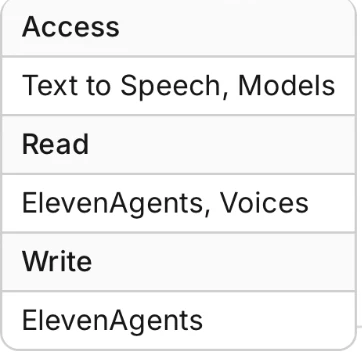
Keeping Restrict key on?
The key needs these:
Voice chat
- Start, stop
- the wave, or Ctrl + Alt + V
- “Hey Capri”
- say it and voice chat starts. Windows, off by default: Settings → HABITS → Security → Listen for “Hey Capri”
- Mute mic
- Ctrl + Alt + N, or the mic button
- Free
- anything but ElevenLabs picked, or no key: you talk, she answers. Her ears download the first time
- ElevenLabs
- CLOUD VOICE → ElevenLabs picked, a Voice ID, a mic
- Resting
- quiet for a while? Just talk and she picks up
ElevenLabs voice chat makes a voice agent called “Capri” in your ElevenLabs account, and your voice goes to ElevenLabs while it's on. Free voice chat hears English, Spanish and 23 other European languages on your PC. She doesn't comment on your screen during voice chat. Other languages are new and not well tested.
“Hey Capri” listens for just those two words, in English, on your PC. Nothing leaves your PC until you say them. Windows shows its mic icon while it's on. It pauses in voice chat, while your mic is muted and in Quiet, and doesn't hear her own voice. The first turn-on downloads an 18 MB pack, and her free voice if it isn't in.
Things she can do Windows
- “Open Spotify”
- apps and games from your Start menu, and sites
- “Play Chippin' In”
- Spotify, or YouTube without it. Name the artist
- “Pause”, “next”
- also “turn it up a bit”, “mute”, “volume to 50%”, “what's playing?”. No brain needed
- “Close Discord”
- switch to, minimize or close apps and tabs
- “Mute my mic”
- Discord mute, also “deafen me”
- “Clip that”
- also screenshots, recording, Task Manager, emoji
- “Send hi to Sam”
- on Discord or another app: she types it and sends it
- “Google the weather”
- opens a Google search
- “Remember …”
- saves it to her notes
For jobs her own pink pointer clicks, and your mouse stays put. She sits on the steps box in the corner while she works; drag her or the box to move both. Only Esc stops her, even mid key-hold, and it stops the whole ask. “Write” or “draft” leaves a message unsent. On Trusted, the default, she asks before buying anything and skips password boxes. Settings → HABITS → Security changes what she asks about; with Type passwords and card numbers on, a password she types only ever shows as dots. Jobs have no step limit.
Watch my screen
- Mainframe → Settings → Watch my screen
- Every: how often she looks
Any time: say “check my screen” and she looks right then.
She remembers what she saw for 3 hours, in text and voice chat, so “what did you see?” gets a real answer. Keep her caught up (on by default) adds the glances she keeps quiet about.
She skips unchanged, blank or loading screens, and stays quiet in voice chat or after 10 minutes away. Qwen3 4B, DeepSeek and most NVIDIA models can't see. Use the free NVIDIA key with nvidia/nemotron-3.5-super-vl-120b-a12b.
Notes, personality, nickname, language
- “Remember …”
- saves to her notes, she reads them every chat
- “Forget …”
- takes it out. “Forget everything about me” wipes them
- Open her notes
- Settings: me.md in Notepad, edit anything
- Nickname
- Settings → “What should she call you?” → Save
- Getting to know you
- after setup she asks what to call you, your pronouns and what you're into. Say skip or stop. Settings → Get to know me asks again
- Language
- Settings → Language, starts a fresh chat
- Chat history
- kept a week, even after a restart
- Her memories
- every chat goes in a daily transcript, and older chats get folded into memories.md, which she reads every chat
- “Remember when …”
- she searches her transcripts on your PC
- Open her memories
- Settings: memories.md and the transcripts folder in File Explorer
She won't save names, addresses, schools, passwords or phone numbers, in her notes or her memories. Transcripts and memories.md stay on your PC. Folding uses the brain you picked: free on your PC, or one small request with a key. Turn off Remember our chats in Settings to stop it.
Who she is
Her personality and safety rules are fixed in her code, the same Capri for everyone, so since 0.7.6 there's no personality.md to edit. Her safety rules are part of who she is: games, songs and jokes are make-believe so she plays along, she talks you out of real-life risks and points you to a helpline if you need one. If you build on her, please keep them as they are. What she calls you, her language and her voice are yours to pick in Settings.
Moving her
- Drag
- sit her on a window, the taskbar or an icon
- Shift + drop
- sit her right there
- Ctrl + drop
- she hangs on, click her to let go
- Double-click
- she rides your cursor
- Ctrl + Alt + C
- get her off your cursor
- Teleport
- tell her "capri, teleport here" or "come here" and she glitches over to your mouse
- Sit on a window
- tell her "sit on my Roblox window", or any app that's open, or "sit on the taskbar"
- Lie down
- she lies down along her window after a few quiet minutes. Move → Lie down, or tell her "lie down" and "sit up"
- Walk
- "walk around", or "teleport somewhere" and she hops onto a random window
- Pet her
- rub your cursor back and forth over her
- Wander
- Move → Wander around, she hops between windows
- Dance
- she dances to music by herself. Move → Dance to music turns it off. Move → Dance or "dance" starts her with or without music, "stop dancing" stops her
- Animations
- "do your glitch", "smile", "blink" or "play your idle animation"
- Sleep
- Move → Go to sleep, or tell her "go to sleep". Click her or say "wake up"
- Other screen
- Move → Bring to this screen or Go to the next screen, or tell her "go to my other monitor"
- Mainframe
- "move the Mainframe to my other monitor" or "bring the Mainframe here"
- Hide, show
- Hide Capri, or tell her "hide". Double-click the tray icon or say "show yourself" to bring her back
She sits on windows that aren't maximized or full screen. She dozes off by herself when you're away. Move the mouse to wake her.
Updates and uninstall
- Windows
- she checks every 3 hours. “Capri update ready” → right-click her → Restart to update
- Check now
- Mainframe → Check for updates
- Mac, Linux
- she says when a new version is out. Right-click her → Get Capri X, download it and replace the old one
- What's new
- the main page changelog, GitHub releases, the Discord
Uninstall
- Right-click her → Quit Capri
- Windows Settings → Apps → Installed apps → Capri → Uninstall
- Remove Capri
Your settings, notes, personality and chat stay in %LOCALAPPDATA%\Capri. Delete that folder to remove everything. Used voice chat? Delete the “Capri” agent in ElevenLabs too.
Privacy
- Stays on your PC
- built-in brain and Ollama chats, her free voice, notes, personality, chat history, settings, your keys
- Brain key
- your messages, her personality, notes and recent chat go to that company. Screen pictures too, if you watch
- ElevenLabs
- what she says. In voice chat: your voice and words, her personality and notes
- Dancing
- reads your sound level in memory, nothing recorded
- “Hey Capri”
- listens on your PC, nothing recorded or sent until you say it
- Analytics
- none
She also connects to GitHub for updates, Hugging Face for her brain download, and DuckDuckGo and YouTube to find songs.
Mac and Linux preview
- Works
- sitting, chatting, Ollama, your own local server or a free NVIDIA key, her ElevenLabs voice or a local voice server, notes, wander, dancing, apps, Spotify, Discord status, “check my screen”, Watch my screen, Check in on me
- Not yet
- Mainframe, voice chat, built-in brain, shortcuts, auto-updates, mouse jobs on Mac
- Brain
- right-click her → Brain, pick an Ollama model, or Get a free NVIDIA key then Use an API key...
- Voice
- right-click her → Settings → Voice → Add ElevenLabs key...
- Settings
- all in her right-click menu
- Security
- right-click her → Settings → Security: the four presets and the five toggles Mac and Linux have
- Files
~/.config/Capri
On Mac, macOS asks “Capri wants to control Spotify” the first time. Press OK.
On 0.6.2 or older?
- Speak replies
- turns ElevenLabs on or off. No free voice yet
- 0.6.9 tests
- Use ElevenLabs box instead of the FREE VOICE and ELEVENLABS rows
- No Settings
- no language, nickname, notes or custom hotkeys yet
- Size
- four buttons: Small, Medium, Large, Huge
- Voice chat
- English only
- Mac, Linux
- no voice
Update to get everything on this page. Your version is at the top of the Mainframe.
Fixes
Install
- “Item Not Found”, or the installer vanished
- Chrome or Edge: Ctrl + J → Keep. Antivirus: restore it from quarantine. Open it from Downloads.
- Antivirus flags it
- From this site or GitHub? A false alarm on a new, unsigned app. Restore and allow it, or check the download.
- Capri vanished after installing
- Your antivirus removed Capri.exe. Restore it, allow it, run the installer again.
- Opera: “Insufficient permissions”
- Use Chrome or Edge, or download from GitHub.
- “Quit Capri from her tray menu, then install again.”
- Right-click her → Quit Capri, then install.
- Mac: “damaged” or “can't be opened”
- Run the xattr line, then open her again. Needs macOS 15+.
- Mac or Linux: no Mainframe
- There isn't one yet. Right-click her.
- Linux: brain offline
- Run
ollama pull gemma4:e4b, then right-click her → Brain.
Brain
- “My brain's offline.”
- Mainframe → Set up her brain, or Free key.
- Download keeps stopping
- Check your internet → Try again. It picks up where it stopped.
- “Brain crashed loading” or “loaded too slowly”
- Close games → Refresh. Or use the free NVIDIA key.
- Slow replies
- Games share your PC's power. Use the free NVIDIA key.
- “Waiting for NVIDIA”
- Pick another model, like
nvidia/nemotron-3.5-bolt-e4b. It's faster, but can't see your screen. - “Key rejected.”
- Forget, copy the key again, paste it → Connect.
- “No credits on this key.”
- OpenAI, Claude and DeepSeek need paid credits. Or use Free key.
- “That model isn't on your key.”
- Pick another model.
- “My brain sent gibberish.” or
<unused49> - She retries on your CPU by herself. Keeps happening? Use the free NVIDIA key.
- She forgets what you said
- Mainframe Settings → Memory → Long, and keep Remember our chats on.
- She makes things up
- Small brains on your PC guess. The free NVIDIA key is smarter.
- PC freezes
- Try the free NVIDIA key, then tell us in the Discord.
Voice
- “ElevenLabs rejected the key”
- That isn't the key. Keys start with
sk_. Make a new one and paste it. - “Key is missing permissions” or “Key can't do that”
- Make a new key with Restrict key turned off. Forget the old one, paste the new one.
- “Voice not found”
- Paste the Voice ID from My Voices, not the name. Library voices go in My Voices first.
- “Out of ElevenLabs credits”
- Credits refill each month. Pick PREBUILT LOCAL or Fish Audio meanwhile. “10,000 / 10,000” means all used.
- “ElevenLabs has restricted your account”
- Sign in at elevenlabs.io to see why. Pick PREBUILT LOCAL meanwhile.
- “Free tier usage disabled”
- Turn off your VPN and try again.
- “ElevenLabs sent a reply Capri couldn't read.”
- ElevenLabs may be blocked where you are, or by a VPN. Try without one, then send Copy error details.
- Test shows words, no sound
- “Voice link online” isn't proof she played. Set your speakers as the Windows default (Settings → System → Sound). Check Mainframe Settings → Volume. Quit and reopen Capri.
- PREBUILT LOCAL, but she only types
- Her free voice isn't installed. Get free voice under VOICE.
- “Can't open your speakers”
- Turn on speakers in Settings → System → Sound. Or close the app holding them, or untick exclusive mode.
- “Can't reach your voice server”
- Start your server, then check its address under CUSTOM LOCAL → Set up. Her free voice fills in meanwhile.
- “Fish Audio wants credit”
- For its free tier, set Model to
s2.1-pro-free.
Voice chat
- She can't hear you
- Pick your mic under VOICE. Check it isn't muted. Windows Settings → Privacy & security → Microphone → let desktop apps use it.
- “Can't open my voice link.”
- Open the Mainframe. The reason and the fix are under VOICE.
- Free voice chat when you want ElevenLabs
- Pick CLOUD VOICE → ElevenLabs. Voice chat follows your VOICE pick.
- “My ears are still downloading”
- First time only. She says when she can hear you.
- “Voice chat needs my Voice ID”
- Pick a voice in the Voice ID box.
- Ctrl + Alt + V does nothing
- Another app may use it. Click the hint in the Mainframe and pick new keys.
Screen and Mainframe
- She never comments
- Settings → Watch my screen. She skips screens that haven't changed.
- “Couldn't read the screen.”
- Most NVIDIA models can't see. Pick
nvidia/nemotron-3.5-super-vl-120b-a12b. - “This brain can't see.”
- Use the free NVIDIA key.
- “The screen capture is black.”
- Set the game to borderless or windowed.
- Mainframe squashed or cut off
- Try Windows Settings → System → Display → Scale → 100%, reopen Capri, and tell us your scale in the Discord.
Moving her
- She's gone
- Double-click her tray icon (maybe under the ^), press Ctrl + Alt + V, or open Capri again.
- Stuck on your cursor
- Ctrl + Alt + C.
- She won't wander
- Turn on Wander around, use your PC for a bit, give it a couple of minutes. Not from a Sit here spot. Needs windows that aren't maximized.
- Floating in mid-air
- Move → Sit on windows.
- Behind your game
- Set the game to borderless or windowed. Settings → Always on top.
- She doesn't dance
- Turn on Dance to music. Give her a few seconds to find the beat.
Doing things
- Wrong song
- Say the song and the artist.
- Spotify opens but doesn't play
- Press the green Play button.
- “No app called X is installed”
- Use the name from your Start menu.
- “Mute my mic” doesn't work
- She uses Discord's default keys (Ctrl + Shift + M). Set them back in Discord.
- Jobs go wrong
- Pick a bigger model, or a Claude key. Esc stops her.
- She won't play a song
- Some words in song names are blocked. Play it yourself.
Updates
- “Windows couldn't verify the update signature.”
- Download the latest
Capri-Setup.exeand install it. Don't get around the check. - Old version won't update
- Install the latest
Capri-Setup.exeover it.
Still stuck?
- Right-click her → Help → Copy error details
- Paste it in the Discord with your Windows and Capri version, the exact message, what still works and what you tried
It's made to leave out your keys, but read it before you post. Mac and Linux: send errors.txt from ~/.config/Capri.
Something out of date? Tell us in the Discord.